> For the complete documentation index, see [llms.txt](https://docs.eclipse.xyz/llms.txt). Markdown versions of documentation pages are available by appending `.md` to page URLs; this page is available as [Markdown](https://docs.eclipse.xyz/developers/eclipse-architecture/lifecycle-of-an-eclipse-transaction.md).
# Lifecycle of an Eclipse Transaction
It's easier to understand the components of the Eclipse Mainnet from the perspective of a transaction.
## 1. Creating a Transaction
As with all chains, users typically start interacting with Eclipse via some dApp. The dApp proposes a transaction for the user to sign with their wallet, and the signed transaction is sent to an **RPC node**.
RPC nodes implement different APIs depending on the blockchain. For example, EVM chains typically implement the [Ethereum](https://ethereum.org/en/developers/docs/apis/json-rpc/) JSON-RPC whereas [Solana](https://docs.solana.com/api/http) VM (SVM) chains have their own JSON-RPC specification.
Eclipse Mainnet implements the SVM JSON-RPC. SVM wallets can send transactions straight to Eclipse full nodes.
## 2. Sequencing Transactions
Once a transaction is received, it must be ordered relative to other transactions. This ordering is important because searchers can capture arbitrage opportunities (miner extractable value or MEV) based on how the transactions are ordered. This job is left to the logical entity known as the **sequencer**.
There are different approaches to sequencing transactions. The simplest approach, which most rollups have implemented at this point, is a centralized sequencer. More sophisticated approaches involve shared sequencers, where the same sequencer is ordering transactions for multiple chains, and decentralized sequencers, where a consensus mechanism is typically inserted into a set of sequencers for a single chain.
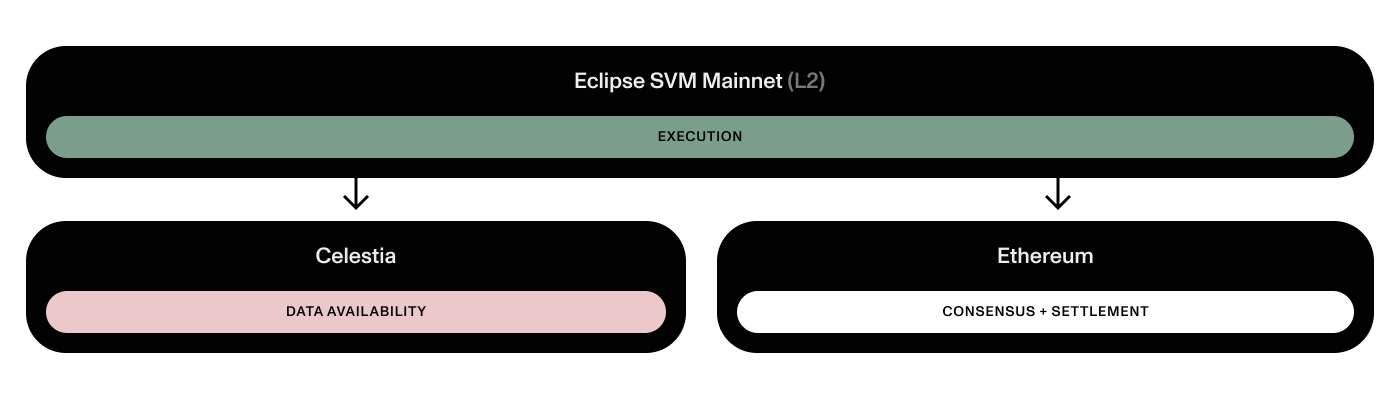
The Eclipse stack can be visually represented as "layers."
## 3. Producing a Block
Once transactions are ordered, a commitment is made to the sequence of transactions and the sequence is fed into an **executor**. This is the executor responsible for computing the resulting state of the blockchain. Remember that blockchains are really just state transition functions:
$$
s' = f(s, t)
$$
Transactions are received, they are executed, and now we have the resulting (untrusted) state root along with a block of transactions. **State root** commitments are cryptographic commitments to the state of a blockchain after a set of transactions has been executed. The tricky part is that Eclipse Mainnet doesn't compute a global state root, as this would force a sequential bottleneck. Instead, a commitment is made of the "state diff".
Eclipse block production is primarily managed by the sequencer, which helps the network by providing the following services:
* Providing transaction confirmations and state updates
* Constructing and executing rollup blocks
* Posting rollup blocks to the data availability layer
For the moment, the Eclipse team runs the only block producer(s). Refer to the Eclipse documentation for more information on how we plan to decentralize the sequencer role in the future.
## 4. Settling a Transaction
All rollups must somehow ensure that the computed state is correct. This is called the **settlement** process. The settlement process varies depending on whether you're running an optimistic or zero-knowledge rollup.
### Optimistic Settlement
The commitment posted to Celestia is relayed to Ethereum. This allows **verifiers** to challenge the computed state.
A **full node** is a node that executes all transactions within a block. (Clearly, executors in the section above are examples of full nodes.) Verifiers are full nodes that pull blocks of transactions from the data availability layer and re-execute them. Verifiers compare their computed commitment against the commitment posted to Ethereum and raise a challenge if there is a discrepancy. Verifiers can raise challenges during a window of time known as the **challenge period**. This challenge utilizes our [zk-VM](https://github.com/Eclipse-Laboratories-Inc/zk-bpf).
If there are no challenges after the challenge period, then the transaction is finalized, meaning that the bridge will not roll back the commitment.
---
# Agent Instructions
This documentation is published with GitBook. GitBook is the documentation platform designed so that both humans and AI agents can read, navigate, and reason over technical content effectively. Learn more at gitbook.com.
## Querying This Documentation
If you need additional information that is not directly available in this page, you can query the documentation dynamically by asking a question.
Perform an HTTP GET request on the current page URL with the `ask` query parameter, and the optional `goal` query parameter:
```
GET https://docs.eclipse.xyz/developers/eclipse-architecture/lifecycle-of-an-eclipse-transaction.md?ask=&goal=
```
`ask` is the immediate question: it should be specific, self-contained, and written in natural language.
`goal` is optional and describes the broader end goal you are ultimately trying to accomplish on behalf of the user. GitBook uses it to tailor the answer towards what is most useful for that goal.
The response will contain a direct answer to the question and relevant excerpts and sources from the documentation.
Use this mechanism when the answer is not explicitly present in the current page, you need clarification or additional context, or you want to retrieve related documentation sections.